Published - Thu, 08 Jun 2023
SendGrid: 3 Ways to Use Email Automation For Your Email Marketing Campaign

SendGrid: 3 Ways to Use Email Automation For Your Email Marketing Campaign

Are you stuck with the question that how to do email automation and is thinking about from where to begin? As email automation runs the personalized messages at flexibility, with it also needs some pre-work and planning to attain positive outcomes.

One can also attain multiple advantages with email automation, no matter if you are just getting started with it. Be your email list as big as possible and how much time and resources you invest to email marketing, you will be able to visualize the changes in your sending with the uncomplicated automation flows.
Now, let’s start with the article!

Here, we will talk about how to use SendGrid emails automation. Now, automation lets you to send a recurring mail to the contacts on its own at a measure you have decided. Once you have designed an automation, you can make them ready to send automatically by including new recipients to a chosen list or segment which will save you a lot of time.

1. Make an Automation

Once you are done with the other necessary requirements, you are completely ready to begin with the creation of your first automation. You can begin with the pre-built welcome series and create it on your own or can begin from the very starting by choosing the custom automation.
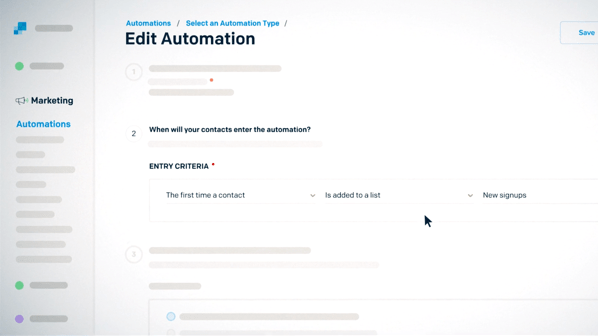
Now, to create a custom automation, what you are required to do is:

  • Go to automations and then click on create an SendGrid automation.
  • Then under custom, you have to click on select.
  • Provide the series with a name and this will just be for your reference and not your contacts.
  • Then, choose the entry criteria. You can select from “the very first time a contact is included to your list” or “the first time a contact is included to a segment.”
  • You can choose an exit criteria for this series. You can select from the contacts that has received all emails in the automation or the contacts that no longer meets the entry criteria or the contact that meets the required criteria.
  • Then choose an unsubscribe group. This group will be applied to all the emails present in your automation.
  • Choose the sending time for the foremost email. You can select to send the first email at the moment or you can set a timer for the email.
  • Create your email by clicking upon Add Email Content.
  • Select a template then utilize a preferred editor for crafting the content.
  • If you wish to add an email, you can click upon add an email.
  • Select how long to wait before sending the next email. This time will be connected with the previous email.
  • Once you have designed all of your emails for the automation, select set live.

2. Utilize the Pre-built Welcome Series

The pre-built welcome series automation will offer a jumping point will influence for creating your own customized welcome series.
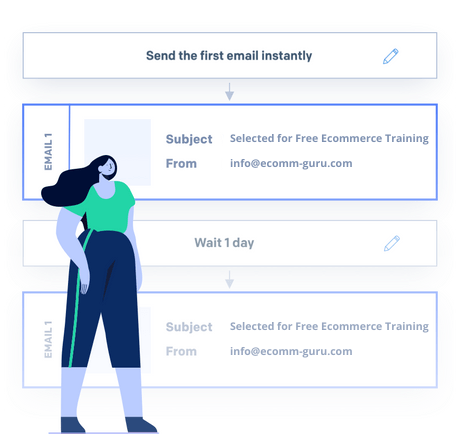
To make a Welcome series:

  • Go to automations and then click on create an automation.
  • Then under welcome, click on select
  • You will have to update your name for your reference which will not be visible to others.
  • Then take a look at the entry criteria to identify if you would wish to update it. The usual entry criteria is “the first time a contact is included to all contacts”
  • Take a look upon the exit criteria to identify that whether you would like to update it or not.
  • Then choose an unsubscribe group. This group will be applied to all the emails present in your automation.
  • The pre-built welcome series consists of 3 placeholder emails as default. You will be required to edit the subject line and then the content of every email. You will have to decide whether you wish to eliminate or include emails to the pre-built series.
  • If you have not done the same with the editor then you can include a subject line and choose a sender from the edit automation page.
  • If you wish to add an email, you can click upon add an email.
  • Select how long to wait before sending the next email. This time will be connected with the previous email.
  • Once you have designed all of your emails for the automation, select set live.

3. Managing Automations

Duplicate an Automation: for duplicating an automation:

  • Go to automations
  • Look for the automation you wish to duplicate
  • Choose the action menu which is present at the right of the automation
  • Select duplicate
  • After creating the duplicate, the automation will be visible to the edit page. Now you can transform one or the complete settings in the automation.

Book your free ecommerce training

Editing an automation:

In this, the subject line, sender and the content can be edited for any email in the automation.

For editing an automation:

  • Go to automations and choose the series that needs to be edited.
  • Choose the option edit on every email that you would to like to make changes in.
  • Make the required changes in the editor and then click upon save.
  • Select the arrow present in the corner of the upper left side.
  • Under the email that has been edited. An alert will be seen that states the changes have not been applied yet upon the live automation and when you will be ready for them to be applied, select the option save and apply.

Disabling an automation: for disabling an automation:

If you wish to disable an automation, all the emails in the automation will stop sending on its own until and unless it is set live once again. Zero new contacts will be added in the automation while it is disabled. If the automation will be set live again, the contacts who were present in the automation list before getting disabled will continue to receive emails exactly as they were left off.

  • Go to automations and choose the series you wish to pause or stop
  • Choose the action menu that is present to the right of the automation
  • Choose the option of disable automation in the corner of the upper right hand side.

If you wish to set the disabled automation live again:

  • Go to automations and choose the series that you wish to re-enable
  • Choose the action menu that is available in the right of the automation
  • Select the option of set live present in the upper right corner

Final Thoughts

It is an obvious fact that after setting the automation live, one will be very eager to see the performance of it. With the assistance of SendGrid automation, you will be able to enjoy the live measurement that will portray you the average performance of the automation and with it the statistics for every email present in the series.

Created by

Yashraj Gautam

Digital Marketer and Sr. Project Leader

View profile

Comments (0)

Search
Popular categories
Latest blogs
The Power of Email Marketing in eCommerce
Unveiling the Email Advantage: How E-commerce Thrives on Targeted CommunicationIn the dynamic world of e-commerce, where competition thrives and attention spans shrink, establishing a strong connection with your customers is paramount. This is where email marketing emerges as a powerful tool, a secret weapon in your arsenal.Unlike fleeting social media posts or impersonal ads, email marketing fosters a direct line of communication with your audience. It allows you to nurture leads, convert browsers into buyers, and cultivate brand loyalty – all at a remarkably low cost.Here's how email marketing fuels the success of e-commerce businesses:Targeted Communication: Email lists allow for segmentation, enabling you to tailor messages to specific customer interests and purchase behaviors. Imagine sending discount codes on athletic wear to gym enthusiasts or promoting new arrivals to recent buyers. This personalization fosters relevance and significantly boosts engagement.Building Relationships: Effective email marketing goes beyond promotions. Share valuable content, industry insights, or behind-the-scenes glimpses into your brand. This humanizes your business, builds trust, and positions you as an authority in your niche.Rekindling Interest: Let's face it, shopping carts get abandoned. Reconnect with potential customers who left items behind with strategically timed reminder emails. Showcase complementary products or offer incentives to complete their purchase.Driving Sales: Targeted promotions, exclusive offers, and flash sales delivered straight to inboxes can significantly boost conversion rates. Announce new product launches or highlight seasonal collections to drive traffic to your website.Customer Retention: Don't underestimate the power of a well-timed "We miss you!" email. Re-engage past customers with personalized recommendations or exclusive loyalty program benefits. This rekindles interest and encourages repeat purchases.Measurable Results: Unlike traditional marketing channels, email marketing offers a wealth of data. Track open rates, click-throughs, and conversion rates to understand what resonates with your audience. Use this data to refine your strategy and maximize your return on investment (ROI).Unleashing the Power of Email MarketingNow that you understand the potential, here are some practical tips to get you started:Build Your List: Offer incentives like discounts or early access to new products in exchange for email signups.Segment Your Audience: Group subscribers based on interests, demographics, or purchase history for targeted communication.Craft Compelling Content: Prioritize clear, concise emails with captivating subject lines to pique curiosity and encourage opens.Design Matters: Invest in visually appealing email templates that showcase your brand and products effectively.Maintain Consistency: Develop an email schedule that keeps your brand at the forefront of your customers' minds without overwhelming them.Prioritize Mobile Optimization: Ensure your emails render flawlessly on all devices, as a significant portion of emails are opened on smartphones.By embracing email marketing, you unlock a powerful tool to nurture customer relationships, drive sales, and cultivate brand loyalty in the competitive world of e-commerce. So, put these strategies into action and watch your online store flourish!

Fri, 15 Mar 2024

Tips for Optimizing Product Pages for Conversions
Turn Window Shoppers into Buyers: 5 Conversion-Boosting Product Page TipsIn the world of e-commerce, your product page is the digital salesperson closing the deal. It's where indecision turns into clicks, and browsers become buyers. But with so much competition, how do you make sure your product pages are optimized for maximum conversion?Here are 5 key tips to turn those window shoppers into loyal customers:1. Content that Converts: Craft Compelling CopyThink of your product page copy as a conversation with a potential customer. Answer their questions, address their pain points, and most importantly, highlight the benefits your product offers.Focus on benefits, not features. Don't just list technical specifications; explain how those features translate into a better experience for the customer.Use clear and concise language. Avoid jargon and technical terms that might confuse your audience.Write in an engaging and informative style. Infuse your copy with personality and enthusiasm for your product.2. Show, Don't Tell: High-Quality Product ImagesIn the absence of a physical store, high-quality images are essential for building trust and showcasing your product. Here's what to keep in mind:Multiple angles and close-ups. Give viewers a 360-degree view of the product.Professional lighting and clear backgrounds. Let the product be the star of the show.Showcase the product in use. Lifestyle images can help customers envision themselves using and enjoying the product.Consider adding product videos. Videos can provide even more detailed information and engagement.3. Build Trust and Credibility: Social Proof is KingPeople are more likely to buy from a brand they trust. Social proof elements like customer reviews, ratings, and testimonials can significantly increase conversions.Display genuine customer reviews. Both positive and negative reviews (addressed appropriately) show authenticity.Feature user-generated content (UGC). Showcase photos and videos from real customers using your product on social media.Include trust signals. Logos from secure payment processors, money-back guarantees, and return policies can alleviate buyer concerns.4. Make the Purchase Seamless: Streamline User ExperienceA smooth user experience is key to avoiding cart abandonment. Here's how to optimize your product pages for easy buying:Clear call to action (CTA) buttons. Make it clear what you want visitors to do (e.g., "Add to Cart" or "Buy Now").Mobile-friendly design. A significant portion of online shopping happens on mobile devices. Ensure your product pages are responsive and easy to navigate on all screen sizes.Multiple payment options. Offer a variety of secure payment methods to cater to different customer preferences.5. A/B Test and Refine: Continuous ImprovementThe best product page optimization strategies are data-driven. Utilize A/B testing to compare different versions of your pages and see what resonates best with your audience.Test headlines, CTAs, image variations, and product descriptions.Track key metrics like conversion rates, click-through rates, and bounce rates.Continuously refine your product pages based on the data you collect.By implementing these tips and staying data-driven, you can transform your product pages into conversion powerhouses, turning curious clicks into satisfied customers. Remember, a well-optimized product page isn't just about aesthetics; it's about creating a clear path to purchase and a positive customer experience.

Thu, 14 Mar 2024

Mastering SEO for eCommerce Websites
Mastering the Art of eCommerce SEO: Attract, Engage, ConvertIn the ever-crowded world of online shopping, where discovery is key, mastering SEO (Search Engine Optimization) for your eCommerce website is no longer a luxury - it's a necessity. It's the secret weapon that propels your store to the forefront, attracting potential customers actively searching for what you offer. But how do you go from SEO novice to eCommerce guru? Here's a roadmap to get you started:1. Keyword Magic: Unlocking Buyer IntentThe foundation of any SEO strategy is keyword research. Here, we delve into the minds of your target audience and identify the terms they use to find products like yours. Think beyond just product names and explore informational keywords. Someone searching for "hiking boots buying guide" is likely on the path to a purchase. Tools like Google Keyword Planner or Ahrefs can be goldmines in this process. Aim for a mix of high-volume, low-competition keywords and long-tail keywords with laser focus.2. Content is King (and Queen):Informational content is your gateway to attracting potential customers. Create a blog that addresses common pain points and buying considerations related to your products. Educate, inspire, and establish yourself as a thought leader in your niche. Don't be afraid to weave in product recommendations strategically, but prioritize value over blatant sales pitches.3. Product Page Optimization: Speak the Search Engine LanguageThis is where SEO and user experience become best friends. Optimize your product pages with targeted keywords in titles, descriptions, and URLs. Craft compelling product descriptions that are informative and engaging for both users and search engines. High-quality images and videos showcasing your products from every angle are crucial. Don't forget schema markup, which acts as rich snippets, providing Google with valuable data about your products, leading to potentially richer search results.4. User-Friendly Navigation: A Frictionless JourneyImagine a maze with dead ends and hidden passages - that's what a poorly structured website feels like. Your site needs to be intuitive and easy to navigate. Organize products into clear categories and subcategories. Implement faceted navigation filters that allow users to refine their searches effortlessly. A mobile-responsive design is no longer optional - it's essential in today's mobile-first world.5. Link Building: The Credibility CurrencyQuality backlinks from reputable websites act as votes of confidence for your store in the eyes of search engines. Earning backlinks organically takes time and effort, but you can jumpstart the process by creating high-value content that others want to link to. Guest blogging on relevant industry websites, creating infographics, and participating in online communities are all great ways to build links.Remember, SEO is a marathon, not a sprint.  Be patient, consistent, and data-driven in your approach. Regularly monitor your website's analytics to see what's working and what needs tweaking. Embrace the ever-evolving SEO landscape and stay updated on the latest trends. By mastering these SEO fundamentals, you'll be well on your way to attracting a loyal customer base and achieving long-term success for your eCommerce website.

Wed, 13 Mar 2024

All blogs